Higher education admissions software · Crossroads by Advant

Admissions work,
with a clear
next step.

Make everyday admissions easier to manage.

From the first inquiry to applications, requirements and decisions, help your team see what’s needed and applicants understand what to do next.

Illustrative scene of three admissions colleagues reviewing information together at a table beside campus windows.
Illustrative campus scene

For public and private colleges and universities, from community colleges to college systems. Built for an institution’s own admissions process, or a shared application across participating colleges.

Admissions application management

One file.
Two clear next steps.

A transcript is more than a box to check. The applicant needs to know what to send. Your team needs to review what arrives. Crossroads gives each side a place to take the next step.

For your admissions team · after the upload

See what arrived.
Know what still needs review.

The document is received; the requirement is still pending. Review the transcript before accepting it as evidence.
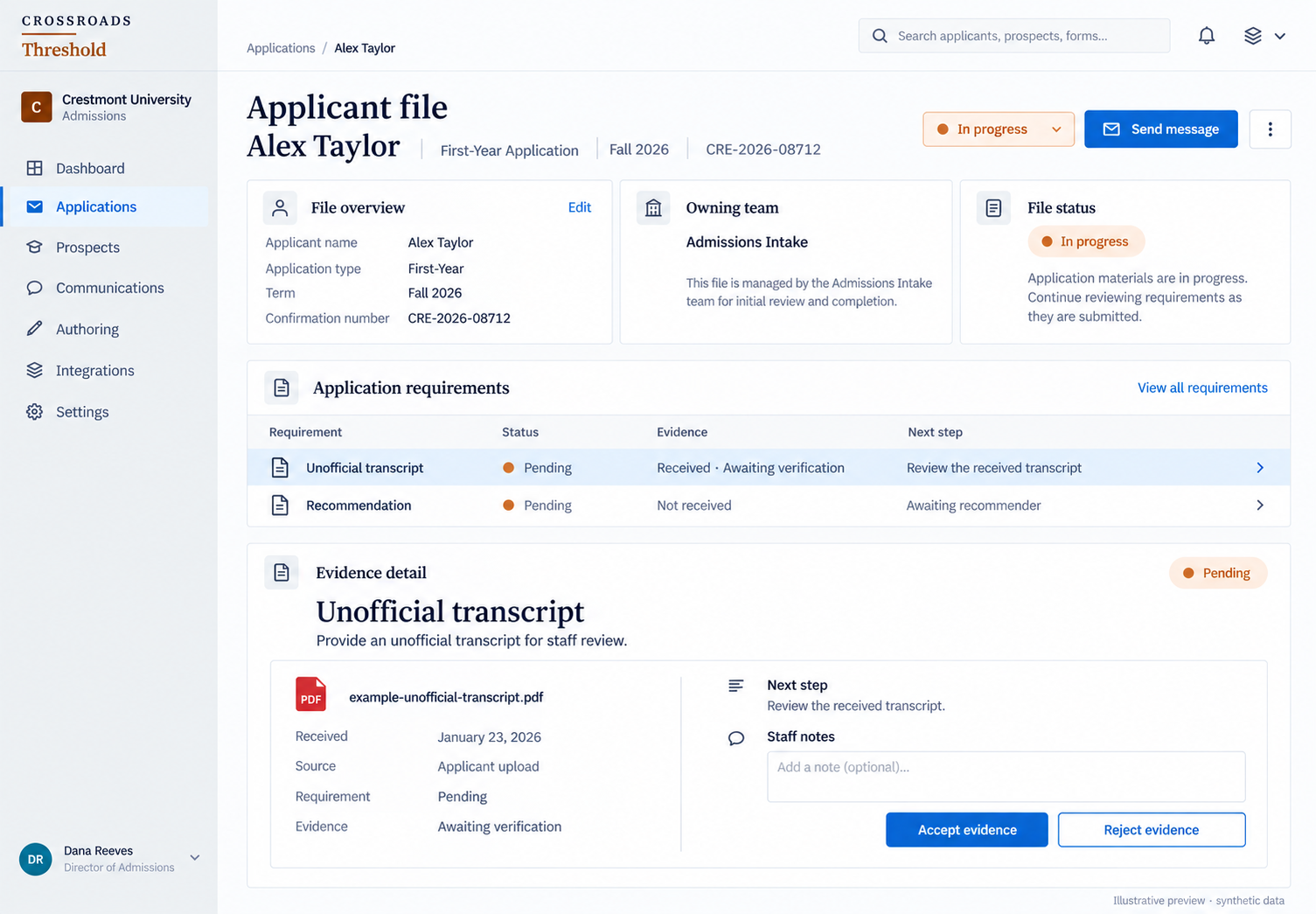
Illustrative staff detail: the unofficial transcript is received and awaiting verification, the requirement remains pending, and staff can accept or reject the evidence.

Swipe or scroll across the detail. With a keyboard, focus the image and use ← →.
Illustrative previewAlex Taylor’s first-year application · staff review detailView full image ↗
Illustrative transcript detail: received January 23, requirement pending, evidence awaiting verification.

Swipe or scroll across the detail. With a keyboard, focus the image and use ← →.
Illustrative previewAlex Taylor’s file · document and requirement statusView full image ↗
Illustrative staff action detail: review the received transcript, then accept or reject the evidence.

Swipe or scroll across the detail. With a keyboard, focus the image and use ← →.
Illustrative previewThe same staff screen · review actionView full image ↗

For the applicant · before the upload

Know what to send.
And where to send it.

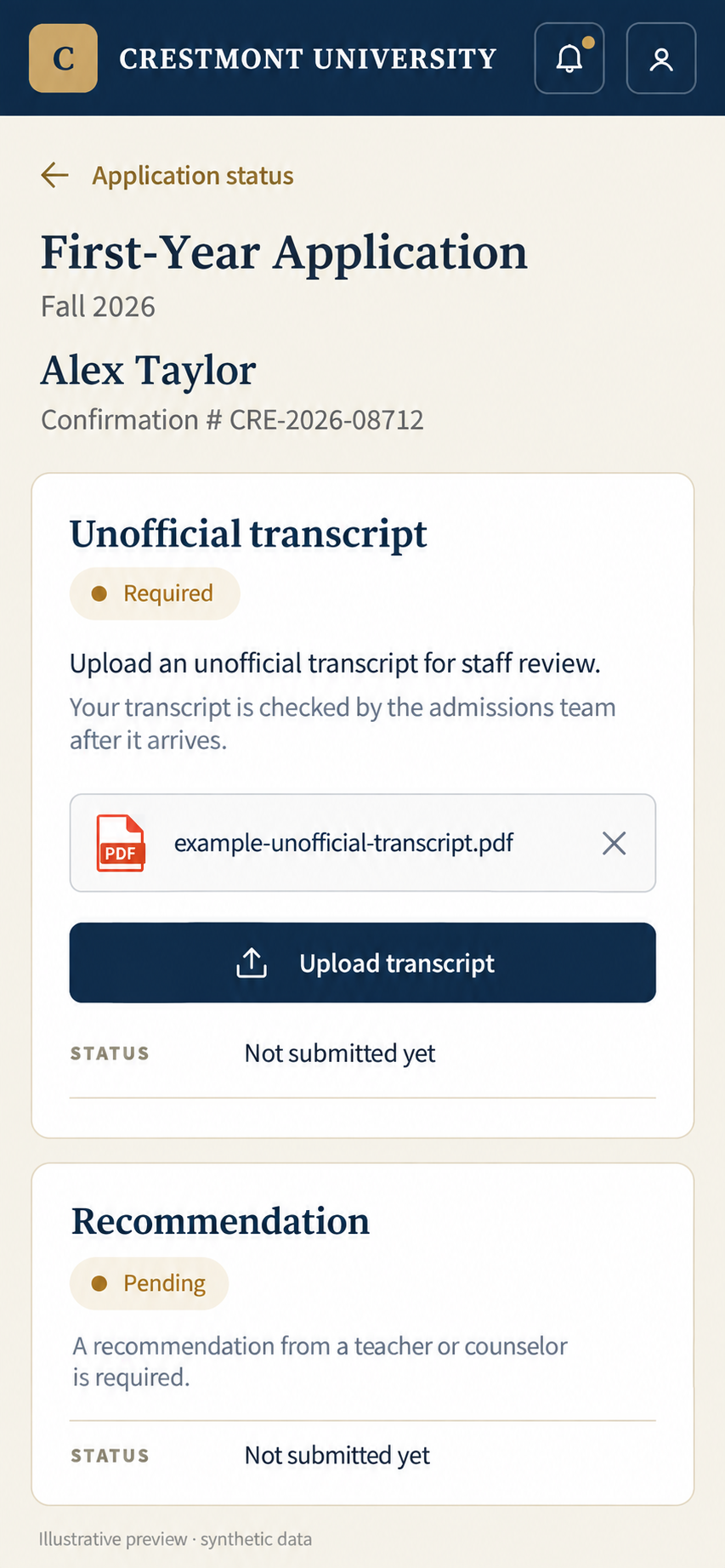
A specific instruction and an upload action, alongside the requirement they need to complete.

Illustrative applicant detail explaining the unofficial transcript requirement, showing a selected example PDF and the Upload transcript action. The document has not been submitted yet.

Swipe or scroll across the detail. With a keyboard, focus the image and use ← →.
Illustrative previewThe same application · applicant upload detailView full image ↗

One fictional application, shown at two different moments.

Follow the full applicant-file example

Applications that your team can work on

Build the application.
Keep making it better.

Work on the questions applicants see. Use form telemetry to find questions worth a closer look. Then make a considered change.

01 / Make the question fit

A visible rule for the Essays section.

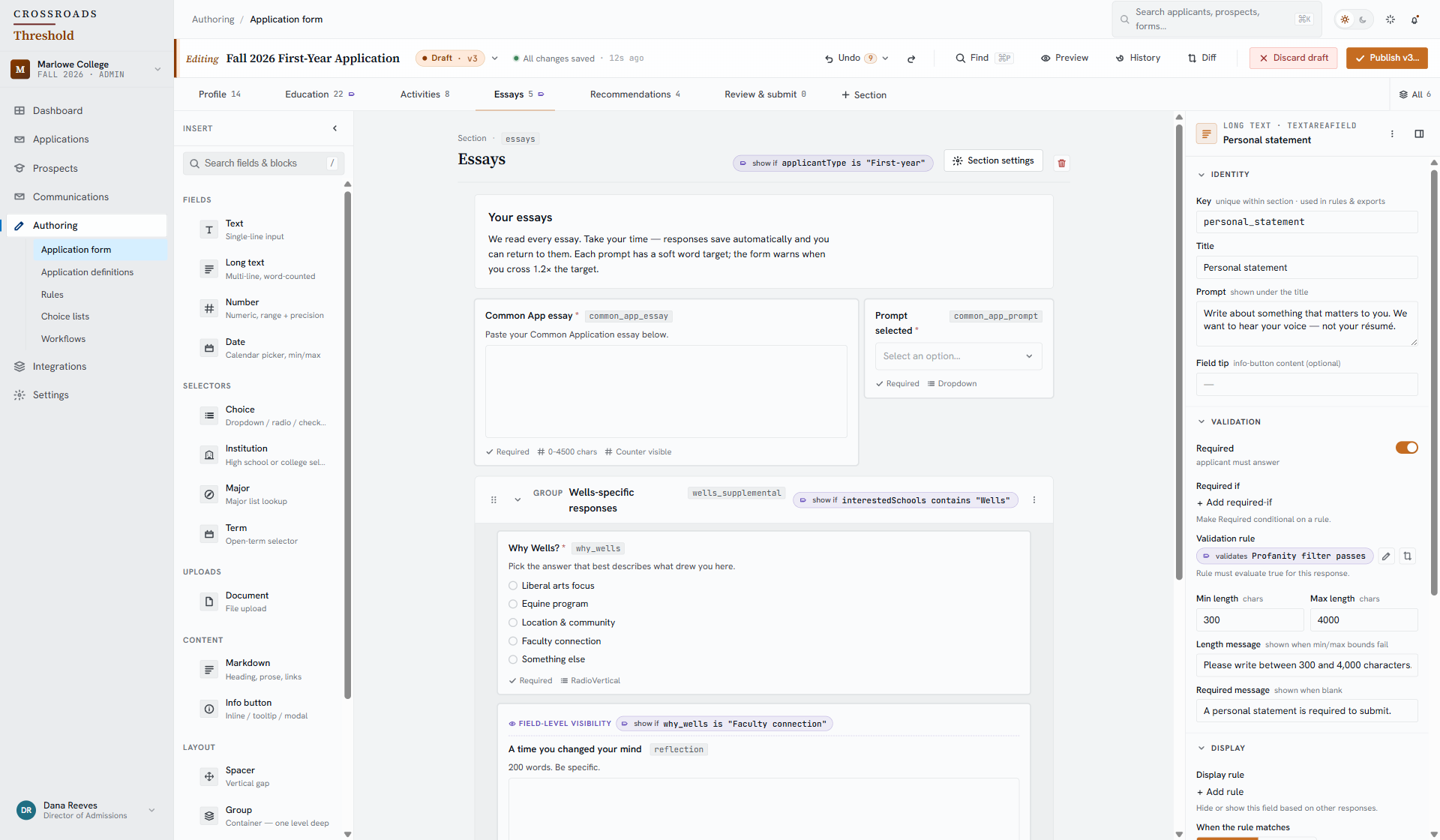
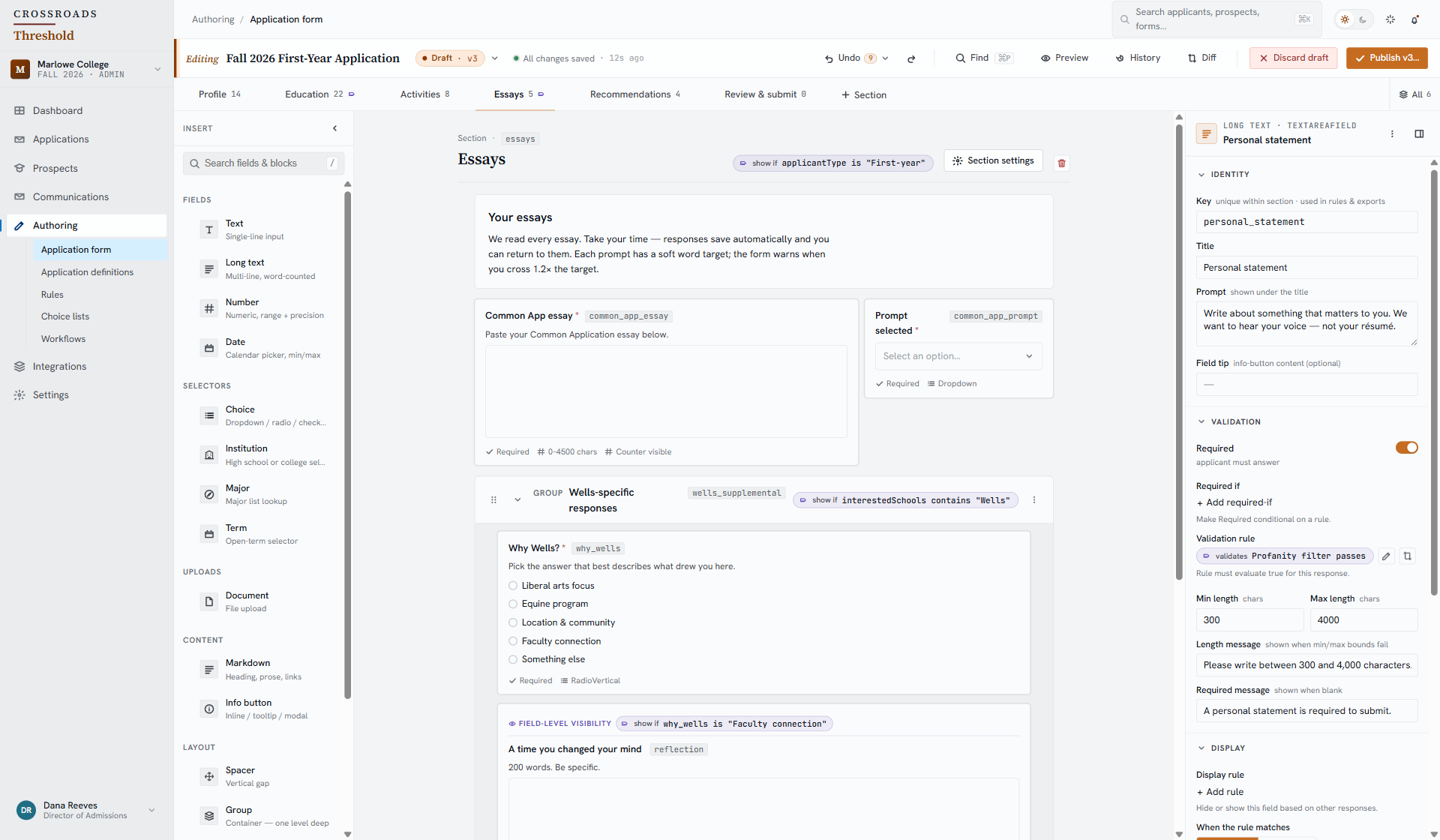
In this application builder example, the Essays section appears for first-year applicants. The condition is visible alongside the section, so your team can see where it applies.

Crossroads application builder detail showing the Essays section, its first-year applicant visibility condition and the essay instructions below.

Swipe or scroll across the detail. With a keyboard, focus the image and use ← →.

Application builder · approved reference capture, example dataView full image ↗
Application builder condition: show the Essays section if applicant type is First-year.

Swipe or scroll across the detail. With a keyboard, focus the image and use ← →.

Essays section condition · detail from the approved referenceView full image ↗

Keep the next revision clearly marked.

Application builder status: Draft · v3 and All changes saved.
Draft and saved state · detail from the same reference
Explore application building

02 / Learn from form use

Find a question worth revisiting.

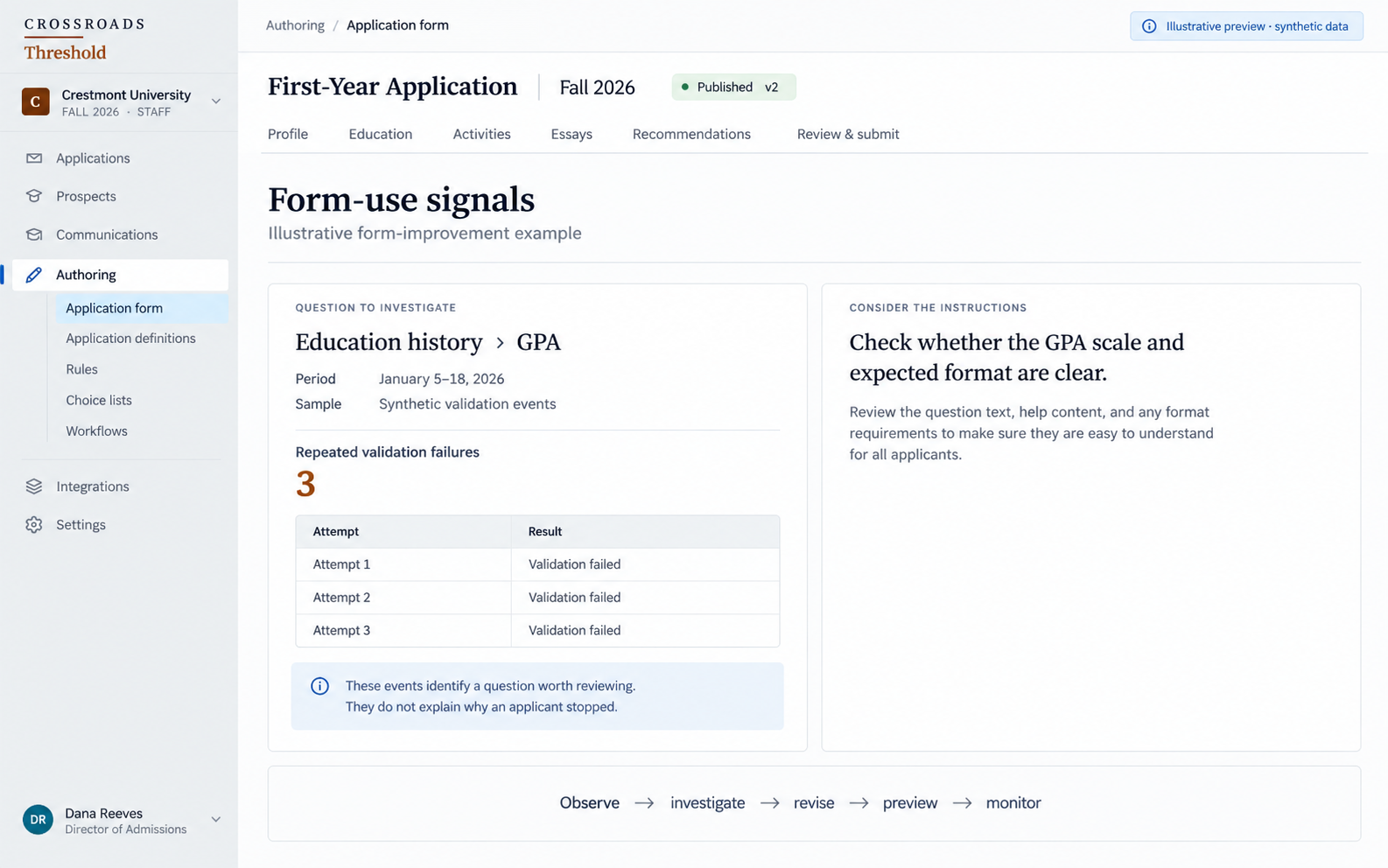
Repeated validation trouble can prompt a useful question: are the instructions clear? Investigate the signal, review the question and preview a revision.

Illustrative form telemetry example: three synthetic validation failures at an education-history GPA question. The note says these events do not explain why an applicant stopped.

Swipe or scroll across the detail. With a keyboard, focus the image and use ← →.

Illustrative previewForm-use signal · fictional GPA exampleView full image ↗

A signal gives your team somewhere to investigate. It does not explain the cause on its own.

Explore form insights

Admissions for college systems

One shared application.
The colleges they choose.

Give your state or community-college system a shared application. Applicants complete common information once, choose participating colleges and submit once.

Each selected college receives its own application for its admissions process.

Explore system applications
One applicant

Shared information,
entered once.

Their selected colleges

  • Alder Grove College
  • Harbor Glen College
Submit once
An application for

Alder Grove College

Its own admissions process.

An application for

Harbor Glen College

Its own admissions process.

Illustrative example · fictional colleges

Your student information system

Workday and Banner.
Connected to Crossroads.

Connect your admissions process with your SIS. Crossroads integrations for Workday Student and Banner are available. Explore the data handoffs, configuration and responsibilities for your institution.

Implementation & migration

Plan the move around
your admissions cycle.

Plan your admissions software implementation with a clear migration scope. Start with the information that needs to move, the people doing the work and the help your team needs.

Security and data questions

Crossroads by Advant

See Crossroads around
a task your team handles.

Choose a product demo or a focused conversation about your admissions process, integrations or move from your current system.